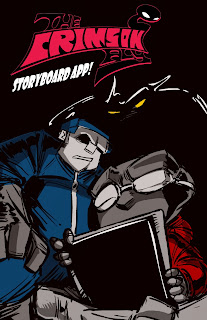
Hey everybody, and welcome to the tutorial no one really wanted about illustrating and coloring in flash. Well, partly in flash. Really, this is just about my current process for drawing stuff, and'll teach you how to go from this:
to this :
Ready? Let's get started.
So first off, I start with a basic thumbnail ...in photoshop? Well, yeah. Flash is awesome and all, but because its a vector based program (it uses math to calculate your every stroke) as opposed to a raster based program (it uses pixels) you don't get the sort of cool opacity based doodling you'd get with a pencil ...or photoshop, since it emulates it pretty well. So I do my basic thumbs and pencils in photoshop.
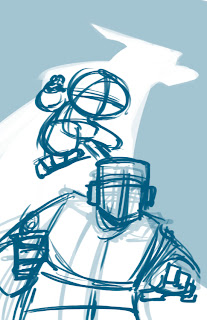
On that note, once I'm satisfied with those thumbs, I do a second thumbs pass? well, this is weird and awkward. Normally, I'd go straight into pencils, but because this is a promotional illustration, I'm being extra careful. The reason for this is I'm a firm believer of making the next step easier for the next guy in the production pipeline, even if that person is yourself. That way, that person can focus on what they're supposed to do instead of always defaulting back to you whenever they have a problem they can't understand. So have a second round of thumbnails, this time fleshing out character details.

Now that I have a more fleshed out thumbnail, we're going into "pencils" (said in quotes because this is digital). I start with the furthest character back because its easier to focus on his lineweight being normal rather than starting with the character in the front and worrying if the front guy's lineweight is overpowering the back guys. Start in the back and you don't have that problem.
Let's see what that looks like. Hmmm... Looks good to me! Let's move on.
Now for the guy in the front. Its important to note that we're also establishing lighting with our characters and that its important to keep it consistent. You can have multiple light sources (and its important to use rim lighting to highlight parts of your character that are important to see but would normally be obscured by shadows), but in a pinch, keep it as simple as possible, to a single light source if need be. In this case, I'm implying that whatever's reflecting off his flashlight is illuminating both characters.

With them illustrated, its now time for the rat in the background. You may have noticed that there is a flow to the illustration onscreen. It goes from the Rat, to the Crimson Fly (the jumping character) to Officer Jones (the jumpsuited guy). Or vice versa. This is called leading the eye and its pretty much what composition is all about. When you lead the eye of the viewer, You tell them what to look at, and make it easier on them to know what parts of your piece to enjoy. This is important in all visual media (illustration, comics, film, video games) as the prettiest art in the world can still be boring if you don't know where to look.
Now that Pencils are done, we can import them into the properly set up flash file (for those who don't know, in Flash: file->"import to library"->select your file->open). I don't import directly to the stage because I don't want flash to automatically turn it into a symbol that I have to rename. No, I take it from the library, and do it myself.
Now that its on the stage, I turn into a graphic symbol (select it -> F8) so I can change the color effect (on the right, in "properties") and turn down the opacity/alpha so I can ink over it.
With that done, I now repeat same process the pencils. Start in the back and move foward with my inks. I'm just using the regular brush tool, at the third circle size with the pressure and tilt settings turned on. Also important to note: I have the smoothing set to 40. Smoothing is the amount of correction flash will apply to a single brush stroke. 100% is your old art professor fixing everything. 0% are those scraggles you made when you were 2 years old. I like to vary depending on the situation. When I'm roughing out animation, 30%. When I'm inking, 40%.
Now that the Fly is done, I turn to Officer Jones. Its worth noting that because my pencils were clean, I'm not having to guess what I was intending when I did the pencil. Making it that much easier for the next guy in the pipeline.
And now all the inks. It's time for coloring...welll... not yet. First, we're going to fill in some grays to help the characters pop from the background when we add color.
Annd done. Now for some color. Here's where it gets tricky. I'm going to do some things that I would not recommend anybody else to do. Its more of a "follow the intent, not the letter" sort of thing. You with me?
The next thing I'm going to do is fill in the character colors. This has more to do with the fact that I'm working in flash, than it says about my painting. Its also about keeping things organized. Filling in the character colors allows me to keep the characters popped out from the background rather than having them faded in. Plus, having already done the grays, I don't have to worry about shading.
Now we add the background. I'm going to confess that its really rough for two reasons: 1. I didn't use my reference files (which you should have and use whenever possible) to draw this, and 2. I didn't really care about the environment as long as the characters popped out of it. Which is bad. Don't do that. Establish your characters (they're what we focus on) and then use them to establish your environment. These backgrounds are drawn at a lower opacity so they don't detract and distract from the characters.
Now that that's done, its time for some lighting! Another do as I say and not as I do: DON'T USE GRADIENTS. Yes, that's exactly what I did, but there's a good reason. Subjectively speaking, I make them look good (RE: SUBJECTIVELY SPEAKING. IF YOU DISAGREE, THAT'S TOTALLY COOL). Once you know how to work without them, its easier to use them. So do that first.
Now that we've established our basic lighting, let's give it some colored lighting. Something to establish both the mood of the environment, as well as separate it from the characters. First I start a gradient overlay, but that really isn't enough so I added a blue overlay on top of that. You can see how this pushes the characters out of the environment.
Next we do an overlay over the entire composition. This helps unify all the elements together, as well as separate it from any graphic design elements that we want audience members to read. Just as with the environment, the first overlay really isn't enough, so we're going to push it with a second overlay.
Throw in a light for the flashlight, and the logo, and we're done! Thank you for sticking around this long, and I hope you'll stay tuned for more process stuff from me!